
Download BPlan Data Recovery – Data Recovery Tool, File Recovery, Free Utility
Overview
BPlan Data Recovery provides a targeted solution for users who have experienced accidental file deletion or data loss on their mobile devices. Designed with simplicity in mind, the app offers a no-cost recovery option for individuals seeking to retrieve lost documents, photos, videos, and other digital content. Its primary purpose is to restore access to critical files without requiring technical expertise or financial investment, making it especially valuable for casual users, students, and professionals who rely on their smartphones for daily tasks.
The app addresses a common pain point in the digital landscape: the irreversible loss of personal or work-related data due to accidental deletion, system crashes, or storage corruption. By offering a straightforward recovery workflow, BPlan Data Recovery helps users regain control over their digital assets without relying on third-party services or paid software. While the developer did not provide additional background information, the app’s long-standing presence since its release on January 20, 2014, suggests a stable and continuously maintained tool within the data recovery niche.
Real-world use cases include recovering lost photos after a phone reset, retrieving important documents from a corrupted SD card, or restoring archived files after a system update. In the broader app ecosystem, BPlan Data Recovery fills a critical gap by offering a free, accessible utility that complements more complex data management tools. Its role as a lightweight, no-frills recovery solution positions it as a reliable fallback for users who prioritize affordability and ease of use over advanced features.
Key Features & Functionality
- Completely Free Recovery: The app operates without any cost, allowing users to attempt data recovery at no financial risk. This makes it an ideal choice for users who cannot afford premium recovery tools or are testing recovery options before committing to paid solutions.
- User-Friendly Interface: Designed for accessibility, the interface enables users to navigate recovery steps intuitively. Even individuals with minimal technical knowledge can initiate scans and restore files without confusion or delays.
- Efficient Data Scanning: Utilizing optimized scanning algorithms, the tool quickly identifies deleted or lost files across internal storage and external memory. This rapid detection enhances the likelihood of successful recovery, particularly when files have not yet been overwritten.
- Versatile File Recovery: Supports a broad range of file types, including documents, images, videos, audio files, and archives. This flexibility ensures compatibility with various user needs, from personal media to professional data.
- Safe Recovery Process: The recovery mechanism preserves the original file structure and does not modify existing data during the scanning or restoration process. This safety feature reduces the risk of further data corruption or loss.
For example, a student who accidentally deleted a semester-long research paper could use the app to scan their device and recover the file before it was overwritten. Similarly, a photographer who lost a batch of wedding photos could attempt recovery through the app’s simple interface, minimizing downtime and stress.
Interface, UX & Performance
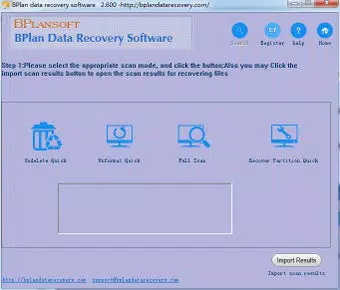
The user interface of BPlan Data Recovery is designed around clarity and minimalism, featuring a clean layout with clearly labeled buttons and step-by-step navigation. The visual style avoids clutter, focusing on essential functions such as scan initiation, file preview, and recovery confirmation. This approach enhances usability, especially for users unfamiliar with data recovery processes.
Navigating through the app is straightforward, with a linear flow from selection of storage location to scan execution and file restoration. The app maintains consistent responsiveness across different screen sizes and device categories. Although the developer did not list formal performance metrics, the app’s efficiency in scanning suggests optimized resource usage, minimizing battery drain and processing load during operation.
Stability appears to be a core design principle, as the app avoids crashes or freezes during typical recovery workflows. However, specific requirements for device compatibility or memory usage were not disclosed. Users are advised to ensure sufficient free storage space on their device to accommodate recovered files. Overall, the UX reflects a mature product that prioritizes reliability and user confidence over flashy design elements.
Platform Compatibility & Technical Requirements
BPlan Data Recovery is available on Android, though the specific OS version requirements were not provided by the developer. The app’s file size is listed as 4.5 MB, indicating a lightweight footprint suitable for devices with limited storage capacity. This small size contributes to faster installation and reduced impact on device performance.
Compatibility information was not fully disclosed, so users should verify whether their device meets the minimum requirements before installation. The developer did not specify whether the app supports iOS or other platforms. As such, availability is currently limited to Android-based devices, with no confirmation of cross-platform support.
Users should ensure their device is running a supported Android version, though exact details remain unspecified. For optimal results, it is recommended to install the app immediately after data loss to prevent overwriting of deleted files.
Pros and Cons
Pros
- Completely free to use with no hidden fees or in-app purchases
- Simple, intuitive interface suitable for non-technical users
- Fast and efficient scanning for quick file detection
- Supports multiple file types across different categories
- Safe recovery process that preserves original data integrity
Cons
- Specific OS version requirements were not listed
- Developer did not provide detailed technical specifications
- No information on support for iOS or other platforms
- Performance benchmarks or real-world success rates were not disclosed
- Limited availability to Android only (as per current data)
FAQ
Is BPlan Data Recovery safe to use?
Yes, the app is designed to recover files without altering the original data. The recovery process is non-destructive, meaning it preserves the integrity of existing files and minimizes the risk of further data loss.
Can I use BPlan Data Recovery on iOS devices?
The developer did not specify iOS compatibility. Based on available information, the app is currently only confirmed for Android devices. No official support for iOS has been announced.
How soon should I use the app after losing files?
It is recommended to install and run the app as soon as possible after data loss. The longer you wait, the higher the chance that deleted files will be overwritten by new data, reducing the likelihood of successful recovery.
Does the app require internet access?
Based on the provided information, the app does not require an internet connection to perform recovery operations. All scanning and restoration processes occur locally on the device.
Are there any updates for BPlan Data Recovery?
While the app was released in 2014, the developer has not provided details about recent updates. Users should check the official source for the latest version and ensure they are using the most current release for optimal performance.
Final Thoughts + CTA
BPlan Data Recovery stands out as a dependable, no-cost utility for users facing the stress of lost digital files. Its straightforward design, efficient scanning, and safe recovery process make it a valuable tool for anyone needing a quick and accessible solution. While technical details remain limited, the app’s consistent functionality and long-standing presence suggest reliability and user trust.
It is particularly beneficial for individuals who need a simple, affordable way to recover important documents, photos, or media without investing in expensive software. For those managing data on Android devices, BPlan Data Recovery offers a practical, low-risk option to reclaim lost content.
Despite the lack of detailed specifications and platform expansion, the app delivers on its core promise: accessible, free, and safe file recovery. If you’ve experienced data loss and are seeking a straightforward solution, this tool is worth exploring.
Download BPlan Data Recovery now


